Develop your own basic fraud indicators
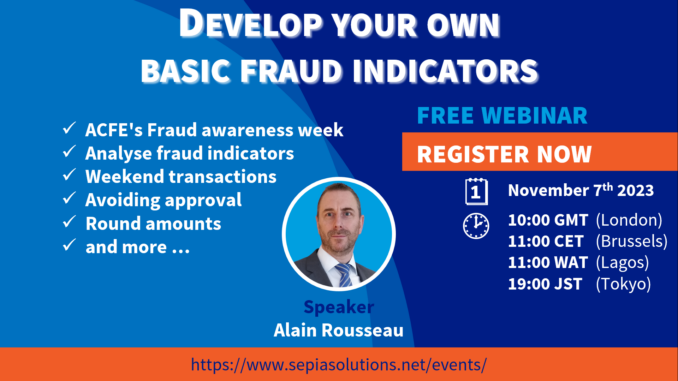
In light of the ACFE‘s annual International Fraud Awareness Week, we organised this free webinar to illustrate how you can develop your own basic fraud indicators with a data analytics platform such as Arbutus Analytics.
Once developed, you can run these analytics against your company data at regular intervals, alerting you via email of anomalies as defined in the analytics.
In this webinar, we illustrate how you can develop your own basic fraud indicators such as transactions with round amounts, or amounts just under approval limits, as well as transactions in the weekend, outside business hours, or on special days such as public holidays.
Note that in the webinar “Develop your own advanced fraud indicators“, we build more advanced fraud indicators such as outliers per vendor, infrequent or one-time vendors, trends in the amounts (per vendor), and if we have time even vendor dependency.
Watch the full recording …
… or dive straight into the chapter of your choice …
Click on the links below to watch the video on the Sepia Solutions Youtube channel starting at that specific section.
Develop your own basic fraud indicators – Shortcuts
Agenda for this webinar

We set the scene for this webinar, covering house rules and the topics for today. The main topics are: The business case, What basic fraud indicators to build, and how to build those indicators.
About me and Sepia Solutions

Of course, we cannot do without a one-minute personal introduction and introduction of the company and GRC software tools.
The business case

The fields in the data set (Timestamp, Amount, and Identity) could be relevant to many different business processes such as accounts payable, accounts receivable, payroll, expenses, etc. And with over 1.7 million records, the data set reflects a real-life situation, not just 80 records of demo data.
What basic fraud indicators?
Why (do I) use Arbutus Analytics?

Before we start building these indicators, let us explore why we use Arbutus Analyzer to do so. We consider the purpose for which the tool was built; how the main principles of the software align with data analysis; and explore the ecosystem of business partners, user community, helpdesk, local events, etc.
How to implement the indicators?
Now we can really get started building those focus indicators (or fraud indicators, or risk indicators as you may call them). The next sections of this webinar are mainly operations within the Arbutus Analyzer software; the slides only introduce the idea of the indicators.
A very short introduction to the tool is presented to give you a flavour, but this is by far not a complete overview of all the features and options. If you would like a more thourough overview, please contact us.
FI_01: Round amounts
Using the Expression Builder, we create a Conditional Computed Field (this does not change the data). This field uses the function Mod() to test whether the value for Amount is a multple of say 10.000 and assign such records a risk score and even colour that risk score in the View.

FI_02: Zero amounts
Depending on the business process/data set, a zero-amount transaction may be considered an anomaly. Or, perhaps a few such transactions may be normal, but a high number of such transactions signify be a yellow flag. Let’s add this flag (indicator) to the analysis.

FI_03: Amounts near threshold(s)
Business processes might require approval for transactions above a certain level. Some people might want to avoid such oversight by crossing that threshold and stay just under that limit. This indicator will flag transactions close to those thresholds. We include a detailed explanation of the Between() function.

FI_04: Transactions during weekend
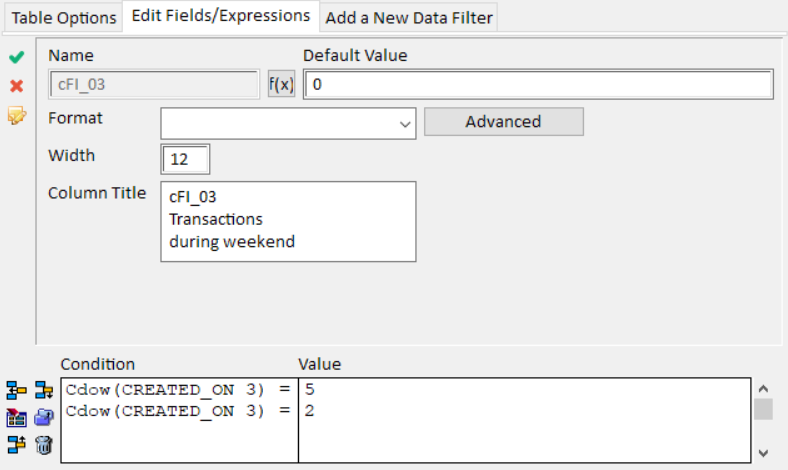
Is it normal that transactions are made on weekend days? This obviously depends on your business and processes. We use the CdoW() function to augment the data with the “day of week” of the transactions and use that information for this indicator.

FI_05: Transactions outside working hours
Is it normal that transactions are made outside business hours or even in the middle of the night? Again this depends on your operating hours. We use the Hour() function on the timestamp to augment the data with the “hour of day” of the transactions and use that information as basis for this indicator.

FI_06: Transactions on (public) holidays
Using the Date() function on the timestamp, we add yet another Conditional Computed Field to identify transactions on what we call “non working days” (holidays, events, business closing, …).

FI_total: Totaling up the indicators
Having built those 6 fraud indicators, we can now total all their values into a last Computed Field which we can then use to identify the transactions with the highest overall risk scores.

The Log, Procedures and exporting the data
Finally, we create a new table by extracting all transactions with a total score above a certain value. This analysis could be turned into a Procedure to repeat the same analysis on the same or different data sets (with the same source fields).

Next steps

How could we help you take the next step on your data analysis journey? Get in touch with us for a discovery call and let us explore your situation and objectives.
Don’t forget or follow-up webinar: Develop your own advanced fraud indicators.
Also, consider evaluating the software with a Arbutus Analyzer trial license and see how you can use it to analyse your own company’s data.
Q&A and closing

A short recap of this session.
Also a repeat of our question to you: Which topics would you like to see addressed in one of our next webinars?
You might be interested in other planned events:
Sorry, no more events are currently planned (or we haven’t updated our website).
Feel free to reach out to us, or check again later.